Vision AI + groq

Published on June 27, 2025 by Eunbi.N
Skeleton UI Loading UX Performance UI Design
AI Vision
- 이미지에서 텍스트 추출: 사진, 스캔 문서, 스크린샷에서 텍스트 인식
- 다국어 지원: 한글, 영어, 중국어 등 다양한 언어 텍스트 인식
- 실시간 처리: 카메라 입력을 통한 실시간 텍스트 추출
- 레이아웃 분석: 텍스트 위치, 방향, 구조 정보 함께 제공
- 정확도 향상: AI 모델 기반 높은 인식 정확도
Vision API 선택 이유
Google Vision API: 클라우드 기반 고성능 OCR
- 높은 인식 정확도와 다양한 언어 지원
- 문서 구조 분석과 손글씨 인식 기능
- 상용 서비스와 높은 정확도가 중요한 프로젝트에 적합
FLOW
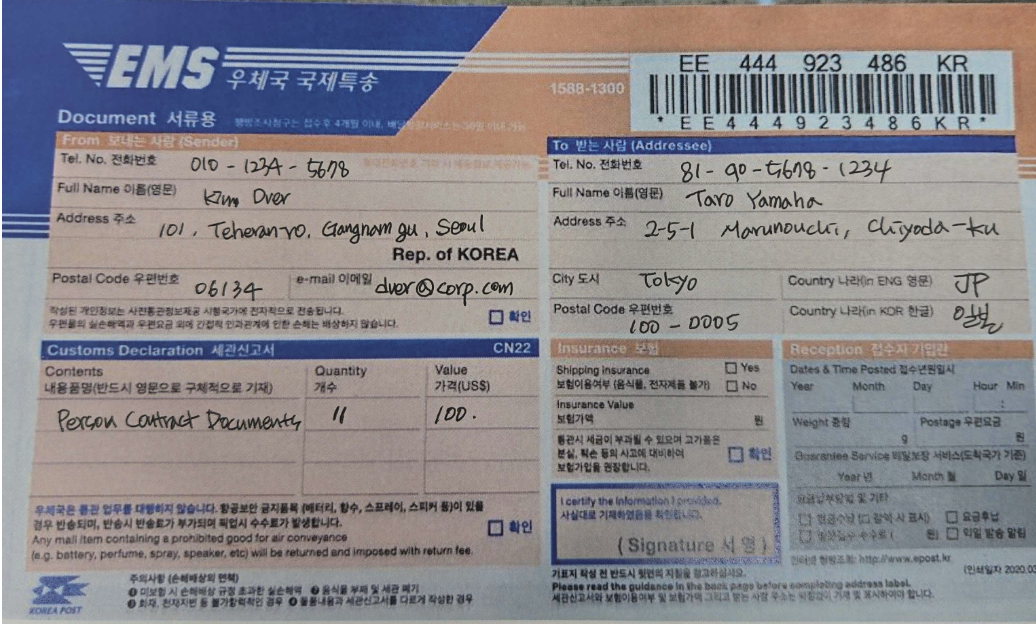
- 국제우편 접수용지에 자필 작성 -> 스캔 / 사진이미지화
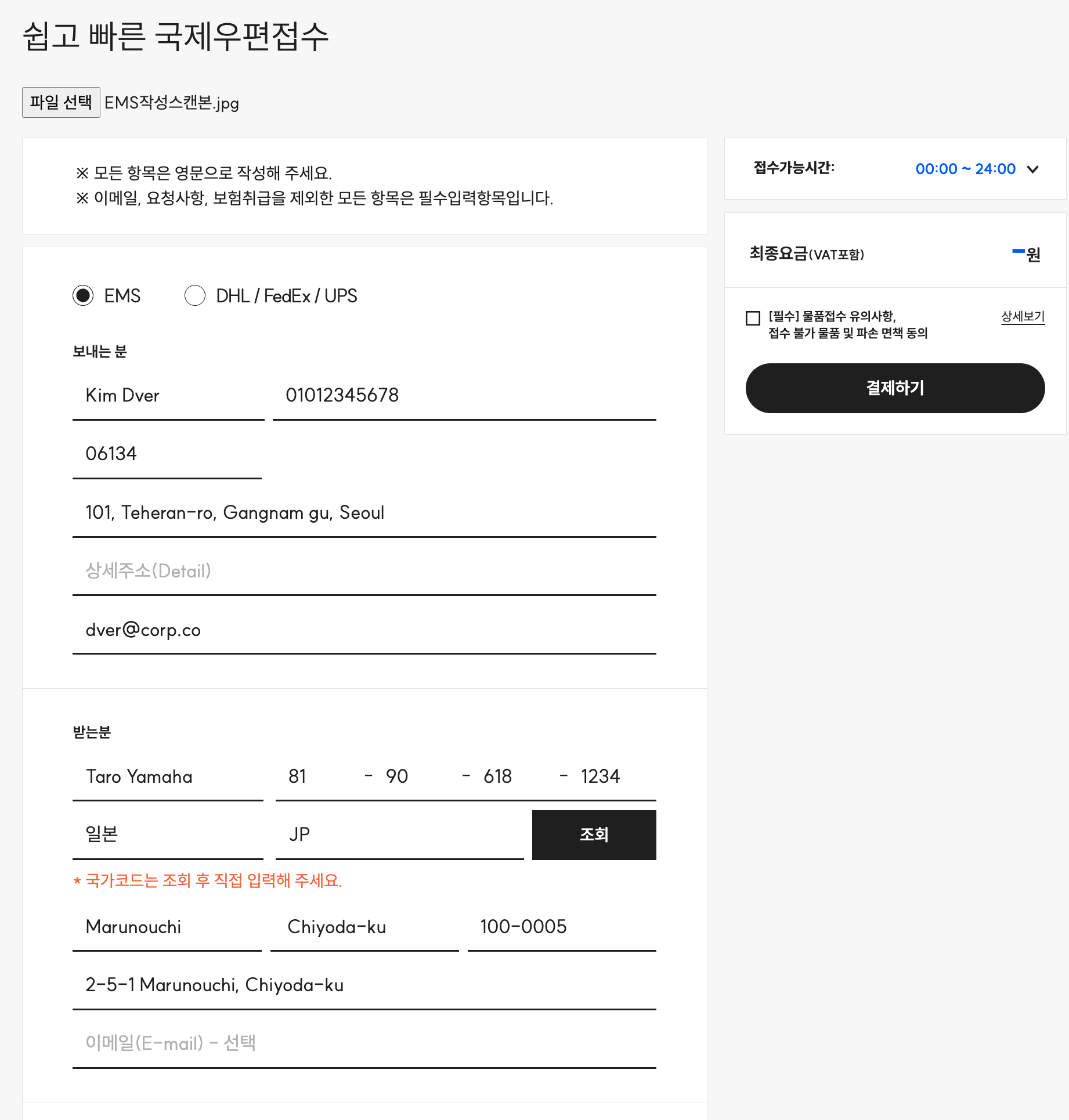
- 파일 업로드시 이미지 -> 텍스트 (OCR - visionAI)
- 사전에 작성해둔 스크립트에 따라 Text -> input value 추론 & 매핑 (groq - openAPI)
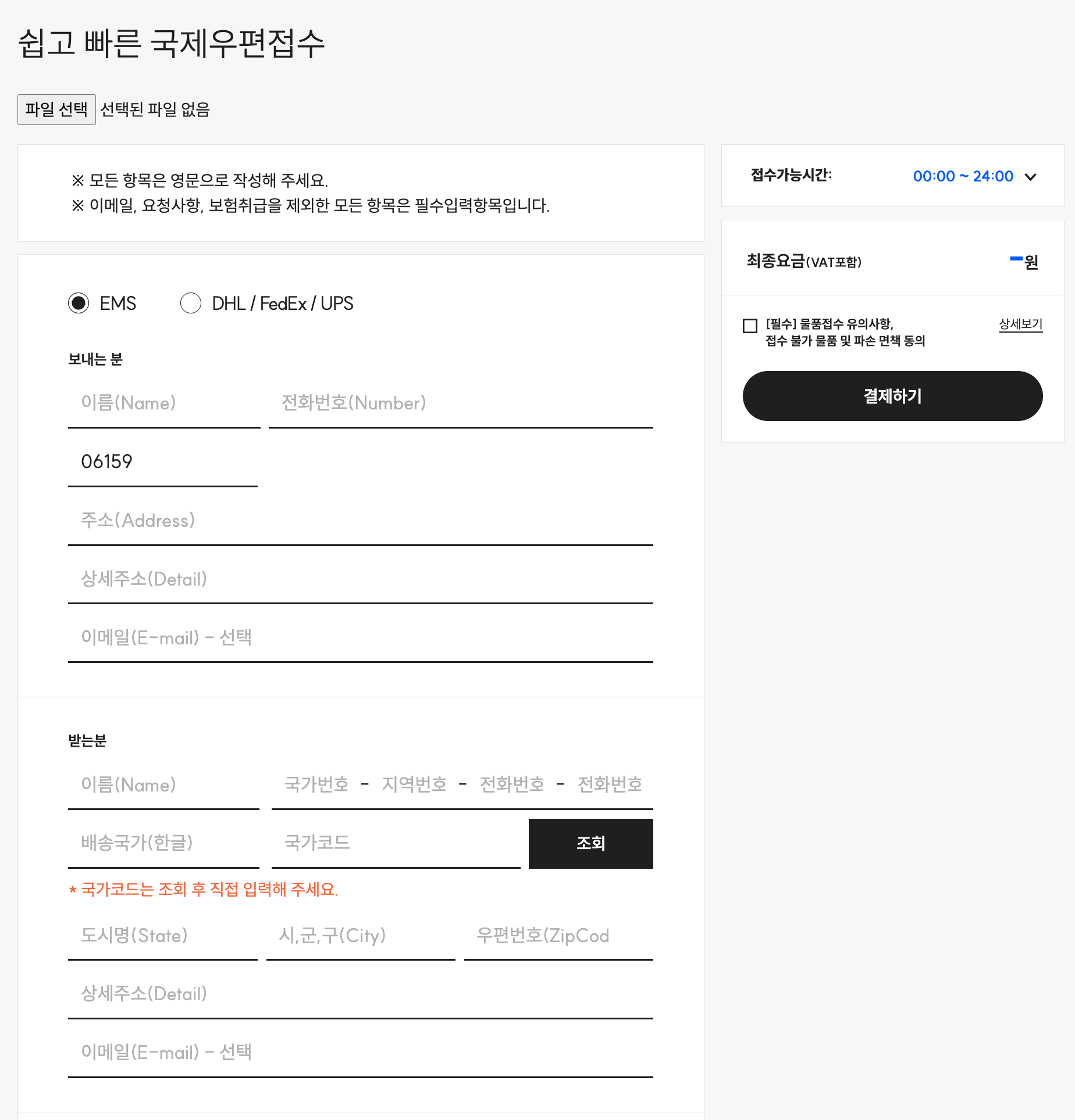
- emsInfo 객체의 key 값에 맞는 value 값 찾아서 자동 적용
- Text Scan Image
- BEFORE
- AFTER
const onFileChange = async ($event: Event) => {
  isProcessing.value = true;
  const file = ($event.target as HTMLInputElement).files?.[0];
  const base64 = await toBase64(file as File);
  const imageContent = (base64 as string).replace(/^data:image\/(png|jpeg);base64,/, '');

  const requestBody = {
    requests: [
      {
        image: { content: imageContent },
        features: [{ type: 'TEXT_DETECTION' }],
      },
    ],
  };
  const response = await axios.post(
    `https://vision.googleapis.com/v1/images:annotate?key=${API_VISION_KEY}`,
    requestBody
  );
  ocrText.value = response.data?.responses?.[0]?.fullTextAnnotation?.text?.trim() ?? '';
  if (!ocrText.value || ocrText.value === '') return;
  await extractWithLLM(ocrText.value);
  isProcessing.value = false;
};

const toBase64 = (file: File) =>
  new Promise((resolve, reject) => {
    const reader = new FileReader();
    reader.readAsDataURL(file);
    reader.onload = () => resolve(reader.result);
    reader.onerror = (error) => reject(error);
  });
async function extractWithLLM(rawText: string) {
  const prompt = PROMPT(rawText);

  const declarationIsNonDoc = ['비서류용', 'Non-Document'].includes(rawText);
  emsInfo.value.customsDeclaration.category = declarationIsNonDoc ? 'DOCUMENT' : 'GIFT';
  //rawText 에서 서류용인지 비서류용인지 체크 (디폴트 : 비서류)
  const declarationType =
    emsInfo.value.customsDeclaration.category === 'DOCUMENT' ? 'declaration-doc' : 'declaration-non-doc';

  try {
    const response = await fetch('https://api.groq.com/openai/v1/chat/completions', {
      method: 'POST',
      headers: {
        'Content-Type': 'application/json',
        Authorization: `Bearer ${API_GROQ_KEY}`,
      },
      body: JSON.stringify({
        model: 'llama3-70b-8192',
        messages: [
          { role: 'system', content: 'You are a helpful assistant that extracts structured data from OCR' },
          { role: 'user', content: prompt },
        ],
        temperature: 0.2,
      }),
    });
    const data = await response.json();
    const content = data.choices?.[0]?.message?.content || '{}';
    const parsedContent = content.match(/```(?:json)?\s*([\s\S]*?)\s*```/)[1];
    const parsedContentJson = JSON.parse(parsedContent);

    emsInfo.value = { ... parsedContentJson };

  } catch (e) {
    console.error(e);
  }
}
OCR 정확도 향상을 위한 이미지 전처리 전략
Image Enhancement: 이미지 품질 개선
- 노이즈 제거, 대비 조정, 해상도 향상 등 전처리
- Gaussian blur, threshold, morphology 연산 적용
- 저품질 이미지와 복잡한 배경이 있는 경우에 적합
Raw Processing: 원본 이미지 직접 처리
- 최소한의 전처리로 빠른 처리 속도
- AI 모델의 자체 노이즈 처리 능력 활용
- 고품질 이미지와 처리 속도가 중요한 경우에 적합
AI 텍스트 분석 - Groq
- 초고속 AI 추론 플랫폼
- LPU(Language Processing Unit) 기반 빠른 처리 속도
- Llama, Mixtral 등 오픈소스 모델 지원
- 실시간 텍스트 분석과 대용량 처리에 적합
후처리 방식 - Text Extraction vs Structured Data
Text Extraction: 순수 텍스트 추출
- 인식된 텍스트를 문자열로 단순 반환
- 검색, 번역, 요약 등 텍스트 기반 처리
- 문서 디지털화와 텍스트 검색이 목적인 경우에 적합
Structured Data: 구조화된 데이터 추출
- 명함, 영수증, 신분증 등 특정 형식 파싱
- 정규표현식과 NLP를 통한 의미 있는 데이터 추출
- 자동화된 데이터 입력과 비즈니스 로직 연동에 적합
성능 최적화 - Batch Processing vs Real-time
Batch Processing: 대량 이미지 일괄 처리
- 큐 시스템과 백그라운드 작업으로 효율적 처리
- 처리 결과를 데이터베이스에 저장하여 재사용
- 문서 관리 시스템과 대량 데이터 처리에 적합
Real-time Processing: 즉시 처리와 피드백
- 카메라 프리뷰와 실시간 텍스트 오버레이
- WebRTC, Canvas API를 활용한 인터랙티브 UI
- 모바일 앱과 사용자 참여가 중요한 경우에 적합